Configuration Settings for an Apache Load-Balanced Hybris Cluster
May 26, 2017

This tutorial demonstrates the configuration details for a two node, load-balanced Hybris cluster using Apache Web Server.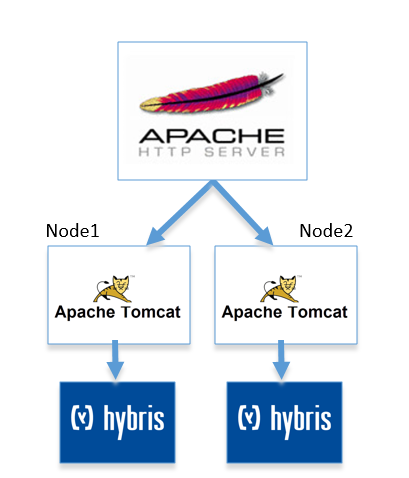
Step 1
Configure Node1’s local.properties file to resemble the following:
yacceleratorstorefront.webroot=storefrontContextRoot=#Clusterclustermode=truecluster.id=1cluster.maxid=2cluster.broadcast.methods=jgroupscluster.broadcast.method.jgroups=de.hybris.platform.cluster.jgroups.JGroupsBroadcastMethodcluster.broadcast.method.jgroups.tcp.bind_addr=127.0.0.1cluster.broadcast.method.jgroups.tcp.bind_port=7800cluster.broadcast.method.jgroups.channel.name=hybris-broadcastcluster.broadcast.method.jgroups.configuration=jgroups-tcp.xmlcluster.broadcast.method.udp.multicastaddress=230.0.0.1cluster.broadcast.method.udp.port=9997log4j.logger.de.hybris.platform.cluster.PingBroadcastHandler=DEBUGlog4j.logger.de.hybris.platform.cluster.udp.UnicastBroadcastMethod=DEBUG
Step 2
Configure Node2’s local.properties file to resemble the following:
yacceleratorstorefront.webroot=storefrontContextRoot= #Clusterclustermode=truecluster.id=2cluster.maxid=2cluster.broadcast.methods=jgroupscluster.broadcast.method.jgroups=de.hybris.platform.cluster.jgroups.JGroupsBroadcastMethodcluster.broadcast.method.jgroups.tcp.bind_addr=127.0.0.1cluster.broadcast.method.jgroups.tcp.bind_port=7800cluster.broadcast.method.jgroups.channel.name=hybris-broadcastcluster.broadcast.method.jgroups.configuration=jgroups-tcp.xmlcluster.broadcast.method.udp.multicastaddress=230.0.0.1cluster.broadcast.method.udp.port=9997log4j.logger.de.hybris.platform.cluster.PingBroadcastHandler=DEBUGlog4j.logger.de.hybris.platform.cluster.udp.UnicastBroadcastMethod=DEBUGtomcat.http.port=10001tomcat.ssl.port=10002tomcat.ajp.port=10009tomcat.ajp.ssl.port=10010tomcat.jmx.port=10003tomcat.jmx.server.port=10004
Step 3
Edit the Apache Web Server httpd.conf file to include the following:
Header add Set-Cookie: "ROUTEID=.%{BALANCER_WORKER_ROUTE}e; path=/" env=BALANCER_ROUTE_CHANGED <Proxy balancer://mycluster>BalancerMember http://127.0.0.1:9001 route=node1BalancerMember http://127.0.0.1:10001 route=node2</Proxy> ProxyPass / balancer://mycluster/ stickysession=ROUTEIDProxyPassReverse / balancer://mycluster/ <Location /balancer-manager>SetHandler balancer-manager Order Deny,AllowDeny from allAllow from all</Location>*This article was inspired by a previous article written by John B. from Hybris.

Marc is the Founder of HybrisArchitect.com.
He enjoys helping others learn more about SAP Commerce Cloud (Hybris). Marc is a SAP Commerce Certified Professional and has held the role of SAP Commerce Cloud Architect at Deloitte, PwC, Brillio (a Bain Company), and Nasty Gal. Marc holds an M.S. Software Engineering from Carnegie Mellon University and a B.S. in Accountancy from California State University, Fresno. He can be reached at: mraygoza@localhost